TL;DR:
- Monitoring exchange rates continuously helps individuals and businesses avoid costly transfer mistakes by understanding and comparing different rate types. Using reliable sources like Wise, OANDA, or official government tools, combined with custom tracking dashboards and rate alerts, enables informed decision-making and savings. Consistently applying a well-defined workflow ensures accurate reconciliation, compliance, and optimized international transfer timing.
Tracking exchange rates means continuously monitoring currency values using reliable data sources and tools calibrated to your specific transaction or travel needs. Whether you send money abroad monthly, invoice international clients, or plan a trip to Europe, the difference between a good rate and a poor one can cost you hundreds of dollars on a single transfer. Platforms like Wise, OANDA, and the U.S. Treasury's currency converter give you the data you need. The challenge is knowing which source to trust, how to read what you find, and how to build a workflow that actually saves you money over time.
How to track exchange rates: sources and rate types explained
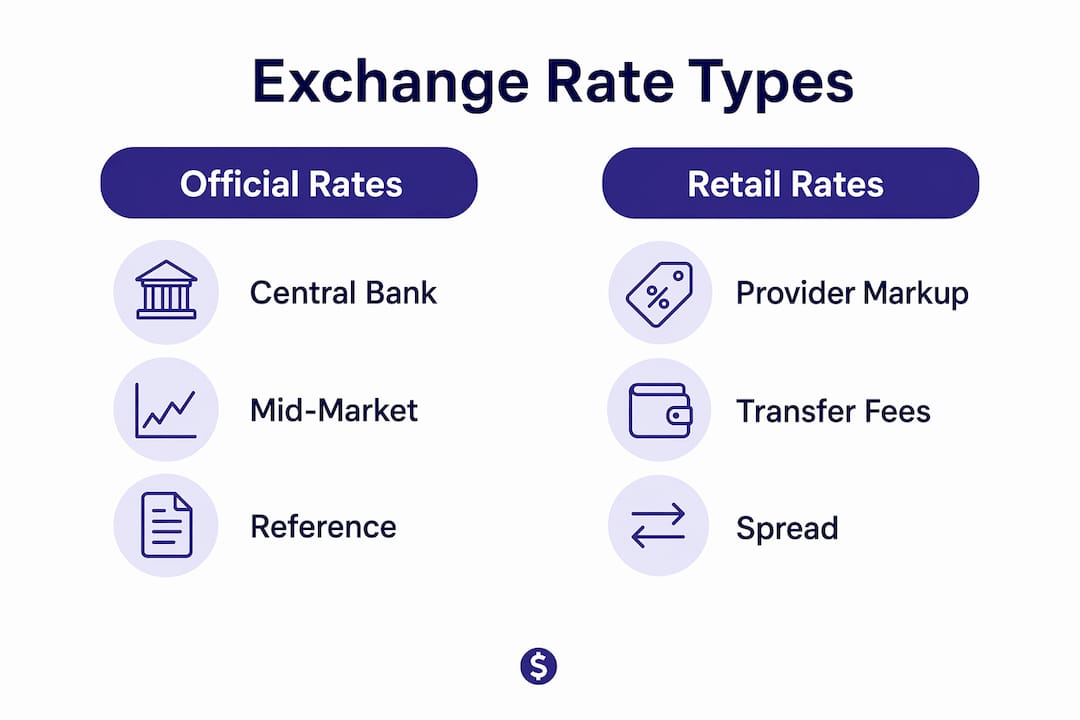
Exchange rate tracking starts with understanding that not all rates are created equal. Three distinct categories exist, and confusing them leads to bad decisions.
Central bank reference rates are published by institutions like the European Central Bank and the U.S. Federal Reserve. The ECB reference rates are updated daily at around 16:00 CET following central bank coordination. These rates are benchmarks for information only, not intended for actual transactions. Using them to price a transfer will give you a misleading expectation of what you will actually pay.
Mid-market rates sit at the midpoint between the buy and sell prices in the wholesale currency market. Platforms like XE and Wise display mid-market rates as a reference point, but the rate you transact at will include a markup or spread on top of this. Knowing the mid-market rate is your best tool for measuring how much a provider is charging you above the true market price.
Retail and bid-ask rates are what banks and money transfer operators actually quote. The spread between the bid (buy) price and ask (sell) price is where providers make their margin. OANDA displays both bid and ask rates, which makes it one of the more transparent tools for understanding the true cost of a conversion.
- Central bank rates: best for benchmarking and compliance reporting
- Mid-market rates: best for comparing provider markups
- Retail/bid-ask rates: the actual rates applied to your transaction
Pro Tip: When comparing providers, always calculate the difference between the mid-market rate and the rate you are being quoted. That gap is your real cost, often larger than the stated fee.
The U.S. Treasury Currency Exchange Rates Converter is specifically designed for federal agency reporting and IRS FBAR purposes. It is officially auditable, which makes it the right choice for businesses that need defensible records. For everyday monitoring, it is less practical than live platforms.
Which tools let you monitor currency rates in real time?
The right tool depends on whether you need a quick check, a historical chart, or a full audit trail. Here is how the main options compare.

| Tool | Best for | Key limitation |
|---|---|---|
| Wise | Live rates, watchlists, transfer pricing | Rates tied to Wise's own product |
| OANDA | Bid/ask spreads, historical data | Interface can overwhelm casual users |
| XE | Charts, multi-currency conversion | No transaction execution |
| U.S. Treasury Converter | IRS/FBAR reporting | Updated less frequently |
| FRED (Federal Reserve) | Official daily spot rates | Data-heavy, not beginner-friendly |
| Google Finance (GOOGLEFINANCE()) | Quick single-pair lookups | No reliable historical snapshots |
Wise, OANDA, and XE each serve different needs within the same category of live tracking platforms. Wise is the most practical for someone who also wants to execute transfers, since its watchlist feature lets you monitor specific currency pairs and receive alerts when rates move in your favor. OANDA goes deeper on spread data, which matters if you are comparing the true cost of conversion across providers.
FRED's daily spot rates from the Federal Reserve are published with specific timing and sourcing, making them reliable for business records and transaction referencing. The Chinese yuan to USD rate on FRED, for example, uses daily noon buying rates. That level of specificity is exactly what accountants and compliance teams need.
Google Finance's GOOGLEFINANCE() function is suitable for single-pair, single-sheet applications but falls short for dashboard or official accounting needs. It lacks bid-ask spread data, reliable historical snapshots, and official source attribution. For casual use it works fine. For anything requiring an audit trail, it is not sufficient.
Currency alert services, including those offered by CXI and built into platforms like Wise, notify you when a target rate is reached. This removes the need to check manually every day and is one of the most underused features available to individual senders and small businesses alike.
How to build a spreadsheet-based FX tracking dashboard
A custom spreadsheet dashboard gives you control that no off-the-shelf tool matches. You define the currency pairs, the refresh schedule, the historical depth, and the output format. The setup takes a few hours but pays off immediately for anyone managing regular international payments.
Here is a practical workflow using Google Sheets and Apify:
- Set up an Apify actor for currency exchange rate scraping. Apify offers free-tier actors that pull live rates from Yahoo Finance and other sources. Connect your actor to a Google Sheets output via the Apify API.
- Write a Google Apps Script to trigger the Apify actor on a schedule. Set it to refresh every 15 minutes during market hours. The script fetches the latest rates and writes them to a dedicated data tab in your spreadsheet.
- Store timestamps with every rate entry. Storing timestamps alongside rates is critical for audit trails. Without source timestamps, reconciling past transactions with current mid-market rates becomes impossible.
- Build a lookup system using an indexed FX rate tab keyed by date. Multi-currency invoice workflows benefit from this structure because it automates correct FX rate application per invoice date, improving both accuracy and auditability.
- Add derived metrics to your dashboard tab: 24-hour rate changes, 7-day trend sparklines, and a live conversion calculator for your most common currency pairs.
Pro Tip: Set your Apps Script timezone to UTC and store all timestamps in UTC. Mixing local timezones in rate data creates reconciliation errors that are painful to trace weeks later.
Commercial FX APIs for live rates often cost between $50 and $2,400 per month depending on the tier. The Apify and Google Sheets approach delivers near real-time tracking for free or near-free, which makes it the practical choice for individuals and small businesses who do not need institutional-grade data feeds.
One common pitfall is caching delays. Apify actors may return cached results if called too frequently. Build in a minimum 10-minute interval between refreshes and log the actual data-pull timestamp, not the script execution time, to keep your records accurate.
| Dashboard element | Purpose | Tool used |
|---|---|---|
| Live rate tab | Current bid/ask/mid for each pair | Apify actor output |
| Historical log | Timestamped rate snapshots | Google Apps Script |
| Lookup table | FX rate by invoice date | VLOOKUP or INDEX/MATCH |
| Trend sparklines | Visual 7-day movement | Google Sheets sparkline() |
| Conversion calculator | Quick FX math for invoices | Formula referencing live tab |
How to apply tracked rates to real financial decisions
Tracking rates is only useful if you act on the data correctly. The most common mistake is mixing intraday live rates with official end-of-day accounting rates without a clear protocol. Mixing these rate types without defined rules causes subtle discrepancies in your books that compound over time. Businesses should define in writing which source and timing applies to each use case.
Here is how different users should apply tracked data:
- Remittance senders: Monitor the mid-market rate daily and set a target rate alert. Send when the rate crosses your threshold, not on a fixed calendar date. This alone can improve your effective rate by 1 to 3 percent on a given month.
- Multi-currency invoicers: Use your indexed FX tab to apply the rate from the invoice date, not the payment date. This protects you from disputes when rates shift between billing and collection.
- Travel budgeters: Check rates two to four weeks before departure. Rates rarely move dramatically in short windows, but knowing the trend helps you decide whether to exchange now or wait.
- Business reporting: Use official end-of-day rates from FRED or the U.S. Treasury for any figures that appear in financial statements. Live rates are for operational decisions. Official rates are for records.
Understanding the role of exchange rates in money transfers goes beyond the number itself. The spread a provider charges on top of the mid-market rate is often larger than the transfer fee. A provider advertising zero fees but quoting a rate 2 percent below mid-market costs more than a provider charging a $5 fee at the true mid-market rate. Tracking rates gives you the data to make that comparison accurately.
Rate alerts are the most underutilized tool in this category. Setting a target rate in Wise or a similar platform means you stop guessing and start acting on real signals. For anyone sending money internationally on a regular remittance schedule, this single habit can generate meaningful savings over a year.
Key takeaways
Tracking exchange rates effectively requires combining the right data sources with a consistent workflow that stores timestamps, separates rate types by purpose, and uses alerts to act at the right moment.
| Point | Details |
|---|---|
| Know your rate type | Central bank rates benchmark; mid-market rates compare; retail rates transact. Never confuse them. |
| Use the right tool per task | Wise and OANDA for live monitoring; U.S. Treasury and FRED for official reporting and audits. |
| Build a timestamped log | Storing rates with timestamps makes past transactions reconcilable and protects you in audits. |
| Set rate alerts | Target rate notifications in Wise or CXI remove guesswork and improve transfer timing. |
| Separate live from accounting rates | Define which rate source applies to operations versus financial records to avoid discrepancies. |
Why most people track rates wrong
Most people check exchange rates the same way they check the weather: a quick glance before a decision, then forgotten. That approach works for casual travel. It fails for anyone sending money regularly or managing international invoices.
The real value of tracking rates is not finding the perfect moment to transact. Markets move too fast and too unpredictably for that to be a reliable strategy. The value is in building a consistent reference point so you can recognize when a rate is genuinely favorable versus when it just feels that way because you have not been paying attention.
I have seen businesses lose thousands of dollars annually not because they used bad providers, but because they had no system for knowing what a fair rate looked like on any given day. They accepted whatever rate appeared on their bank's transfer screen because they had nothing to compare it against. A simple Google Sheets dashboard with weekly rate snapshots would have changed that entirely.
The other mistake I see constantly is treating all rate sources as equivalent. An ECB reference rate and a Wise live rate are not the same thing, and using one where the other is appropriate creates errors that are hard to trace. Pick your sources deliberately, document why you chose them, and apply them consistently. Consistency matters more than precision in most practical contexts.
For individuals, the single most impactful habit is setting a rate alert and waiting for it to trigger rather than sending on a fixed day each month. That one change, applied to a $500 monthly remittance, can realistically save $50 to $150 per year depending on currency pair volatility.
— Brahim
Find the best rates before your next transfer
Knowing how to track exchange rates is only half the equation. The other half is finding a provider that actually offers competitive rates when you are ready to send.

Idealremit compares live rates and fees from providers including Western Union, MoneyGram, Remitly, and Wise in one place, so you can see exactly which service gives you the most for your money on any given transfer. Users have saved up to 80% compared to traditional banks by switching to the right provider at the right time. With coverage across more than 100 countries and real-time rate data, Idealremit gives you the comparison layer that turns rate tracking into real savings. Compare transfer services now and see what your next transfer should actually cost.
FAQ
What is the most reliable source for tracking exchange rates?
The U.S. Treasury Currency Exchange Rates Converter and FRED are the most reliable for official and auditable purposes. For live market monitoring, Wise and OANDA provide accurate mid-market and bid-ask data updated in real time.
How often do exchange rates change?
Exchange rates change continuously during market hours, with major currency pairs moving multiple times per minute. For practical tracking, checking rates once or twice daily is sufficient for most individual senders and small businesses.
What is the difference between mid-market and retail exchange rates?
The mid-market rate is the midpoint between buy and sell prices in the wholesale market. Retail rates include a markup or spread added by the provider, which is where transfer costs are often hidden beyond the stated fee.
Can I track exchange rates for free?
Yes. Tools like XE, Wise watchlists, and the GOOGLEFINANCE() function in Google Sheets are free. For a more advanced setup, combining Apify's free-tier actors with Google Apps Script delivers near real-time tracking at no cost.
Why does timing matter when sending an international transfer?
Exchange rates fluctuate daily, and a 1 to 2 percent difference in rate on a $1,000 transfer equals $10 to $20 in real money. Setting a target rate alert and waiting for it to trigger, rather than sending on a fixed date, consistently improves the value received by the recipient.